
First person view model#
What you see of yourself in first person is the body's view model, body.viewModel: a pair of
arms and whatever they hold, drawn in front of your camera. It is a model kept at the camera and
posed every frame.
It has its own Animator, so first-person clips play on it and not on the body. Other players never
see it: they see the body and the body's tracks.
--!strict
local me = script.parent :: Character
if me ~= game.players:me() then return end
local view = me.viewModel
view.enabled = true

local reload = view.animator:loadAnimation(game.world:find("reload") :: Animation)
reload:play(0.1)
That turns the view model on with your skin's arms and plays a view clip on it.
What it is made of#
Character
  ViewModel "viewModel"      enabled, model, fieldOfView, arms, unlit, worldScale
    Animator "animator"
    Bone "camera"            made on your client
      Bone "rightArm"
        Bone "rightItem"
      Bone "leftArm"
        Bone "leftItem"
Every body is made with a ViewModel and its Animator. The bones are only made on the client that
wears the body, the first time a script asks for them or the first frame it draws, and they never
replicate. A server script sees viewModel.joints as an empty table.
| Property | |
|---|---|
enabled |
draw the view model even when no clip plays |
model |
a res:// .bbmodel to use instead of your skin's arms, see a Blockbench view model |
fieldOfView |
the view model's own field of view in degrees. 0, the default, uses the one Minecraft draws its hand with |
arms |
draw your skin's arms when there is no model. On by default; turn it off when your own meshes are the arms |
unlit |
draw the parts and meshes in it at full brightness, with no shading and no light from the world. The arms stay lit |
worldScale |
how much of a metre one view model unit is when it is placed in the world, 0.4 by default, see where it is in the world |
visible |
off never draws it, whatever else says so |
cframe |
where your eye was this frame, written by your client. The bones' worldCframe follows it |
| Member | |
|---|---|
animator |
the view model's Animator |
joints |
its bones by name, a table like { camera = Bone, rightArm = Bone, ... } |
isActive() |
whether it is drawn this frame |
When it draws#
The view model is active when it is visible and any of these hold: it is enabled, it has a
model, it holds a visible part, or one of its tracks is playing or still fading out.
- While it is active and you are in first person, it takes the place of Minecraft's hand, whatever
appearance.firstPersonsays. - When it is not active nothing changes: the hand, and
firstPerson = "arm","hand","body"and"none", behave as they always did. - In third person the view model is not drawn. A body drawn in first person with
firstPerson = "body"is still drawn under it.
It is drawn the way Minecraft draws your hand: after the world and on top of it, so it never pokes
into a wall. It uses the field of view Minecraft gives its hand rather than the world's, so your
field of view setting does not stretch it; fieldOfView gives it one of its own.
The arms wear your skin, slim or wide, sleeves and all. Your held item, body.rightItem and
body.leftItem or their overrides, is drawn at rightItem and leftItem the way it is held in
third person.
The rig#
The bones live in the camera's space: the camera bone is the eye, -z is where you look, +x is
right and +y is up. At rest the arms sit exactly where Minecraft holds its empty hand, so turning
enabled on with no clip looks like the hand you know, with both arms out. rightItem and
leftItem are the grips, where an item sits in the fist.
Every frame, on your own client, the view model is posed in this order:
- every bone goes back to its rest,
transformthe identity andscaleone; - its tracks move on by the frame's time and pose the bones, with the same priorities, weights, masks and blending as any other track;
- render step functions run, so a script can add to what the clips did;
IKControls whose end effector is in the view model are solved;- the camera is placed and the view model is drawn.
Because every bone starts from rest each frame, a script adds to the clips by multiplying:
bone.transform = bone.transform * offset. A transform written once outside a render step is gone
the next frame. JointSprings do not run on the view model.
The camera bone#
The camera bone's transform is added to your camera after the camera has been placed. Its
position is along the camera's own axes, then it turns the view. A clip that kicks camera up kicks
your view up. The arms hang under the camera bone, so they stay where they are on the screen while
the world behind them moves.
It only changes what you see. Where you aim, what you click and where your body looks are the player's own look, as before, and other players see nothing of it. It applies in first person only.
Playing a clip on it#
A clip with "space": "view" is made for the view model. Load it with the view model's animator:
local reload = body.viewModel.animator:loadAnimation(game.world:find("reload") :: Animation)
reload:play(0.1)- A view clip loaded on a body's animator is refused with an error. It names
camera,rightArmand the rest in the camera's space, which would twist a body out of shape. - A body clip loaded on the view model works, but only the joints the two share move. A body clip
that moves legs, a torso or a head prints a warning once. Mark a clip made for the view model with
"space": "view". - The server or a client can load and play a view clip. The track replicates like any other. The wearer's client plays it once a frame, and other clients keep it but never draw it.
- Markers and events fire on the server for tracks the server plays, and on the wearer's client.
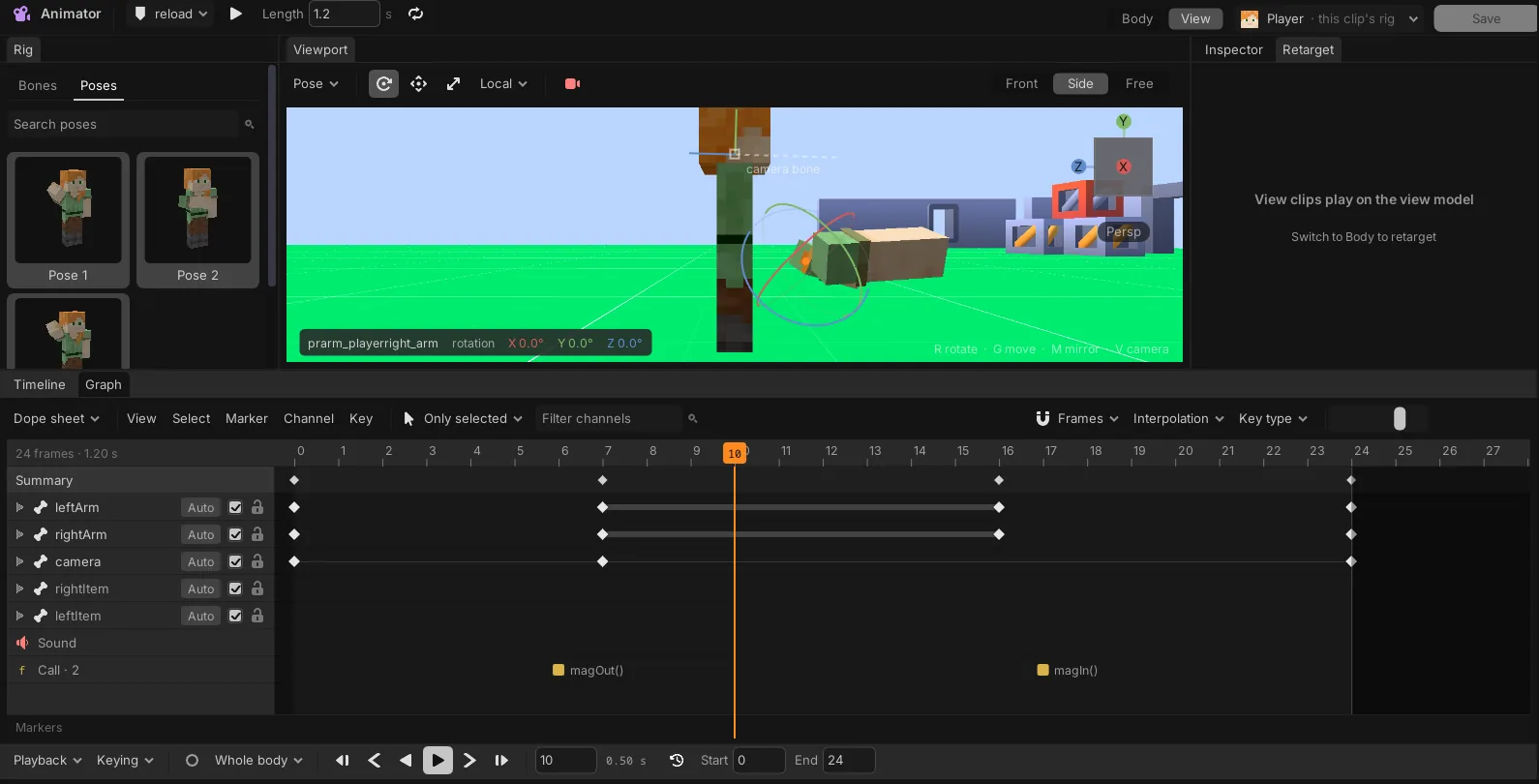
A reload, animations/reload.anim:
{
  "version": 2,
  "length": 1.2,
  "loop": "once",
  "space": "view",
  "priority": "action",
  "joints": {
    "leftArm": {
      "rotation": [[0, [0, 0, 0], "catmullrom"], [0.35, [-40, 25, 10], "catmullrom"],
                   [0.8, [-40, 25, 10], "catmullrom"], [1.2, [0, 0, 0]]],
      "position": [[0, [0, 0, 0]], [0.35, [0.05, -0.1, 0.05]], [0.8, [0.05, -0.1, 0.05]], [1.2, [0, 0, 0]]]
    },
    "rightArm": {
      "rotation": [[0, [0, 0, 0], "catmullrom"], [0.35, [15, 0, -35], "catmullrom"],
                   [0.8, [15, 0, -35], "catmullrom"], [1.2, [0, 0, 0]]]
    },
    "camera": { "rotation": [[0, [0, 0, 0]], [0.35, [-2, 0, 3]], [1.2, [0, 0, 0]]] }
  },
  "events": [
    { "time": 0.3, "name": "magOut", "payload": { "volume": 0.8 } },
    { "time": 0.85, "name": "magIn", "payload": { "volume": 1 } }
  ]
}
Sway, bob and recoil#
Sway, bob and recoil are yours to write, in a render step, on top of whatever the clips do. This
LocalScript is copied into every body through
StarterCharacterScripts. The arms lag behind the mouse,
the camera bobs while you walk, a click kicks the camera up, and R plays the reload above with a
sound on its event.
--!strict
local me = script.parent :: Character
if me ~= game.players:me() then return end
local view = me.viewModel
view.enabled = true

local joints = view.joints
local reload = view.animator:loadAnimation(game.world:find("reload") :: Animation)
local magOut = me:add("Sound", { soundId = "res://sounds/mag_out.ogg" }) :: Sound

reload:getMarkerReachedSignal("magOut"):connect(function(payload: any)
    magOut.volume = payload.volume
    magOut:play()
end)
reload.ended:connect(function()
    print("reloaded")
end)

local kick = 0
local sway = vec3(0, 0, 0)
local walked = 0

input.inputBegan:connect(function(object: InputObject, typing: boolean)
    if typing then return end
    if object.inputType == "mouseButton1" then
        kick += math.rad(4)
    elseif object.keyCode == "r" then
        reload:play(0.1)
    end
end)

game:bindToRenderStep("viewModel", 200, function(dt: number)
    local turned = vec3(-input.mouseDeltaX, input.mouseDeltaY, 0) * 0.0015
    sway = sway:lerp(turned, math.min(1, dt * 10))

    local speed = vec3(me.velocity.x, 0, me.velocity.z).magnitude
    walked += dt * speed * 1.6
    local stride = math.min(1, speed / 5)
    local bob = vec3(math.sin(walked) * 0.02, -math.abs(math.cos(walked)) * 0.03, 0) * stride

    kick *= math.exp(-dt * 14)

    local eye = joints.camera
    eye.transform = eye.transform * cframe.new(bob) * cframe.angles(kick, 0, 0)
    for _, name in { "rightArm", "leftArm" } do
        local arm = joints[name]
        arm.transform = cframe.new(sway) * arm.transform
    end
end)- The render step runs after the clips each frame. The bob and the kick are added to the reload's own camera move, and the sway is laid over the arms wherever the reload put them.
kickdies away on its own, so each click adds to it and the view settles back.- The sway comes before the arm's own transform, so it slides the whole arm along the camera's axes.
Reaching with IK#
An IKControl works on the view model's bones like on any other, solved each frame after the render
steps. The left hand holding a foregrip on whatever the right hand carries:
--!strict
local me = script.parent :: Character
if me ~= game.players:me() then return end
local view = me.viewModel
local joints = view.joints

local grip = joints.rightItem:add("Attachment", {
    name = "foregrip",
    cframe = cframe.new(vec3(0, 0.1, -0.35)),
}) :: Attachment

view:add("IKControl", {
    name = "support",
    type = "position",
    chainRoot = joints.leftArm,
    endEffector = joints.leftItem,
    target = grip,
    smoothTime = 0,
})
The foregrip hangs off rightItem, so it follows every clip and sway that moves the right arm, and
the left arm turns to put its hand on it.
- A skin arm is one bone, so it points its hand at the grip.
- An arm of two bones in a Blockbench view model bends at the elbow to reach it, with a
poleto pick the way.
See IK and springs for every IKControl property.
A Blockbench view model#
Set model to a .bbmodel in the place and it replaces your skin's arms:
view.model = "res://models/rifle.bbmodel"- Each Blockbench group becomes a
Bonewith the group's name, nested like the groups, and its cubes are drawn with it. A group namedrightArmis the bone a view clip'srightArmkeys move, so name the groups after the joints your clips use. - The model's origin is the eye, looking north,
-z. A top-level group namedcamerais the eye instead, and every other top-level group hangs under it. Without one, acamerabone is made at the origin. - Groups named
rightItemandleftItemget your held items. Without them nothing is held. - Textures must be saved inside the
.bbmodel. Only cubes are drawn; mesh elements are skipped. - Changing
modelbuilds the bones again, so anything you put under the old bones goes with them. A model that cannot be read falls back to the skin arms and says why in the output. - A clip imported with
scene.importBbmodelmoves these bones by the same names. Give it"space": "view"so it is not taken for a body clip.
Parts and meshes in first person#
Any Part or MeshPart you put in the view model is drawn in first person with the arms and
nowhere else. It can sit straight under the view model, under one of its bones, or inside a Model
there. This is how a glTF weapon with its own arms is held, and how a heads-up display tilts in 3D
in front of the camera.
A glTF rig in hand, with a tilted health panel:
--!strict
local me = script.parent :: Character
if me ~= game.players:me() then return end
local view = me.viewModel
view.fieldOfView = 60
view.arms = false

local eye = view.joints.camera
local gun = eye:add("MeshPart", {
    name = "shotgun",
    meshId = "res://models/shotgun.glb",
    size = vec3(0.3, 0.35, 0.9),
    cframe = cframe.new(vec3(0.25, -0.3, -0.6)),
}) :: MeshPart
gun.animation = "Equip"
gun.animationLooped = false

local plate = eye:add("Part", {
    name = "health",
    size = vec3(0.4, 0.2, 0.01),
    transparency = 1,
    cframe = cframe.new(vec3(-0.35, -0.25, -0.8)) * cframe.angles(0, math.rad(14), 0),
}) :: Part
local panel = plate:add("SurfaceGui", { pixelsPerMetre = 1000 }) :: SurfaceGui
panel:add("TextLabel", { size = udim2.fromScale(1, 1), text = "100", textScaled = true, backgroundTransparency = 1 })

local function shoot()
    gun.animationFade = 0.05
    gun.animation = "Shoot"
    gun.animationTime = 0
endgun.animationTimeis where the clip is andgun:getAnimationLength("Shoot")how long it lasts, so a script reads how far a clip has got from them.- The sway, bob and kick above move
cameraand the arm bones, so whatever hangs under them moves with them.
How such a part behaves:
- Placement. Its
cframeis from its parent, so under the view model it is from your eye:-zis ahead,+xright,+yup. Underjoints.camerait also follows the camera bone, kicks and bob included. It is placed after the render steps and the camera, in the same frame it is drawn, so it never trails the camera. - Drawing. It is drawn after the world with its own depth, so it never pokes into a wall, and
with the view model's
fieldOfView. A part draws itscolorandtransparency; textures and shaders are forMeshParts. A part withtransparency = 1is not drawn, which makes it a good plate for aSurfaceGui. - Light. It is lit by the world's lights and their shadows from
where you see it, by the sun and by the light where you stand, or not
at all with
unlit. - Not in the world. It never collides, is never touched, raycast or clicked, and nobody else sees it. A light or particle emitter in it still lights and emits in the world, from where you see it.
- Clips. A
MeshPartplays its clips as anywhere else, withanimation,animationFade,animationSpeedandanimationTime, andBones named like its joints still bend a skinned one. A gun and an arm are twoMeshParts playing their clips side by side. - Guis. A
SurfaceGuiorBillboardGuion a part in it is drawn in first person too, in front of the world, so a panel turned 14 degrees reads as a tilted heads-up display. Its text stays sharp at anypixelsPerMetre, which only sets how many pixels the panel is laid out in. Its buttons answer the free pointer, see clicking a screen in the world.
Where it is in the world#
The view model is drawn at a size of its own: at rest the hand sits more than a metre from your eye.
Its bones and parts keep their cframe and transform in those view model units, so clips, offsets
and Blockbench models work as they are.
Their worldCframe and position are where you see them in the world. The view model is pulled
towards your eye by worldScale, and the difference between its field of view and the camera's is
taken out, so a point in it lands on the same pixel it is drawn on, just closer. At the default 0.4
the empty hand is about half a metre in front of you. Writing worldCframe or position on
something in the view model takes a world frame and puts it back in view model units.
So the view model meets the world where you see it:
- A light in the view model, under a bone or a part, lights the world from where you see it, and its light falls on the arms too.
- The arms, the held item and the parts in it are lit by the world's lights as if they stood there, with the shadows those lights cast. A torch that faces a wall lights your hand, and a lamp on your right lights the right side of your arm.
- A particle emitter in it emits from where you see it.
A beam that leaves from the lens of the torch in your hand:
--!strict
local me = script.parent :: Character
if me ~= game.players:me() then return end
local view = me.viewModel
view.enabled = true

local torch = view.joints.rightItem:add("MeshPart", {
    meshId = "res://models/torch.glb",
    size = vec3(0.1, 0.1, 0.4),
    cframe = cframe.angles(math.rad(-90), 0, 0),
}) :: MeshPart
local lens = torch:add("Attachment", { position = vec3(0, 0.2, 0) }) :: Attachment
local beam = game.world:add("SpotLight", { brightness = 4, range = 30, outerAngle = 30, shadows = true }) :: SpotLight

game:bindToRenderStep("torch", 300, function()
    beam.cframe = cframe.lookAt(lens.worldCframe.position, lens.worldCframe.position + camera.cframe.lookVector)
end)- The beam is in the world, not in the view model, so it lights everything ahead. It starts at the
lens because
lens.worldCframeis in world space. - It points along the camera, which is where the torch points on screen.
- The arm and the torch are lit by the beam's spill and by anything else that shines on them.